Mission map
OpsQuest teaches operational problem-solving through incidents rather than isolated command drills. Missions provide a disposable environment, describe an observable goal, and accept any supported command sequence that produces the required outcome.
Learning journey
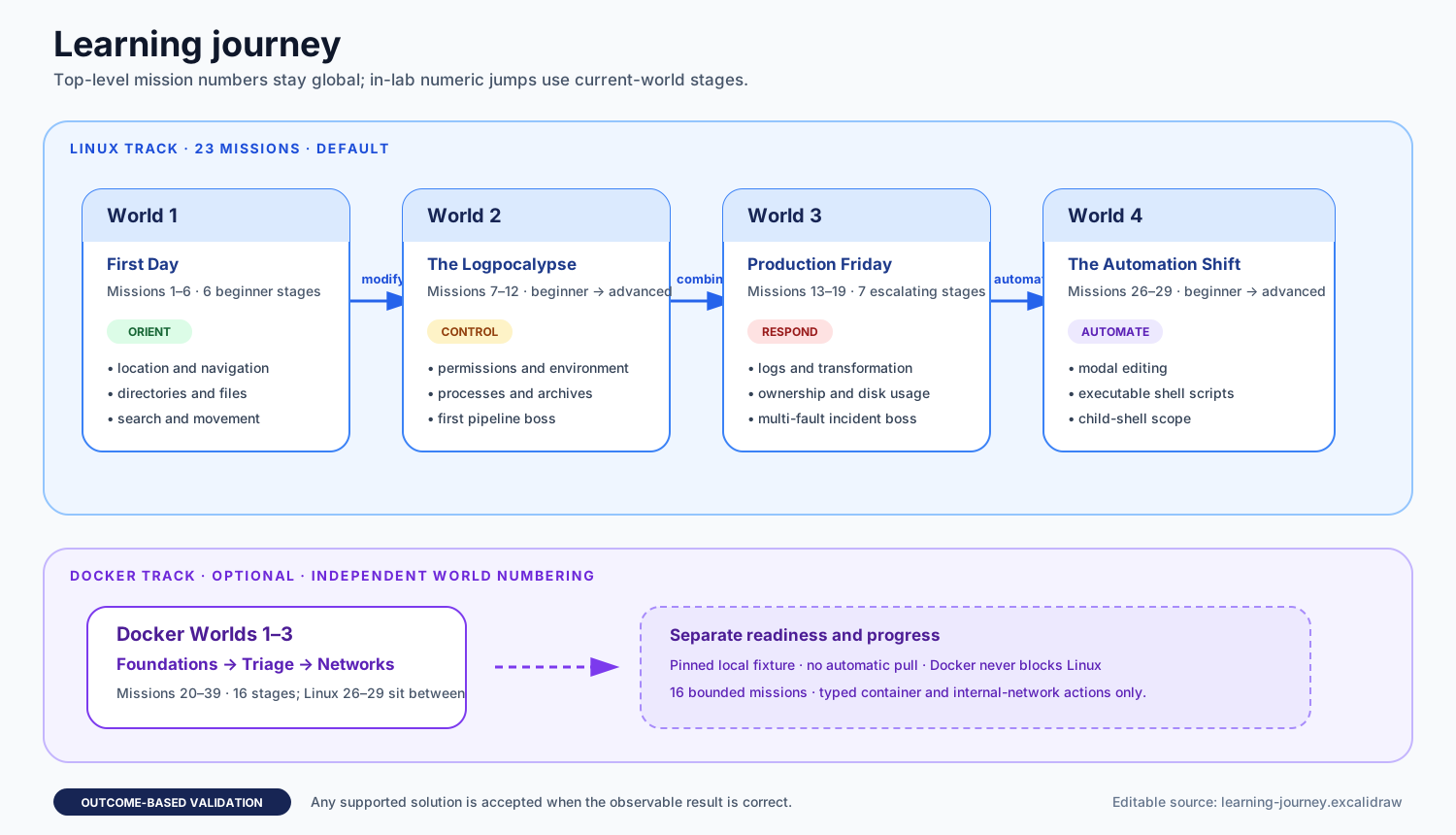
Editable source: learning-journey.excalidraw
The curriculum has two independent tracks:
- Linux: 23 missions across four ordered worlds. Bare
opsquest playfollows this track. - Docker: 16 optional missions across three worlds: Foundations, Container Triage, then Network Plumbing. Docker readiness never blocks Linux play.
Display numbers are global across both tracks: Docker World 1 occupies Missions 20–25, Linux World 4 resumes at Mission 26, Docker World 2 continues at Mission 30, and Docker World 3 at Mission 35. World and stage positions are derived separately inside each track. Persisted completions use stable mission IDs rather than display numbers, so profiles created before this expansion remain compatible.
The learning philosophy explains the incident loop and feedback model. Mission authoring describes how validators preserve equivalent solutions.
Follow or explore the path
$ opsquest play                 # resume Linux progress
$ opsquest map                  # see every world and stage
$ opsquest map --track docker   # see the optional Docker worlds
$ opsquest play --world 3       # stay within Production Friday
$ opsquest play 19              # begin at a global mission number
$ opsquest play linux-find-logs # begin at a stable mission ID
Worlds recommend an order but do not lock content. Every mission remains
directly playable and replayable. Use --once when you want one mission rather
than continuous play.
Current mission map
The “tools” column records suggested commands, not a mandatory solution. Outcome names are the declarative validator types exercised by the mission.
| Global # | Track position | Difficulty | Primary learning focus | Suggested tools | Observable outcomes |
|---|---|---|---|---|---|
| 1 | Linux W1.1 | Beginner | Identify the current directory | pwd |
Output equals |
| 2 | Linux W1.2 | Beginner | Inspect and navigate a directory tree | pwd, ls, cd |
Current directory equals |
| 3 | Linux W1.3 | Beginner | Read the correct short handoff file | ls, cat, less |
Output equals |
| 4 | Linux W1.4 | Beginner | Create directories and files | ls, mkdir, touch |
Directory and file exist |
| 5 | Linux W1.5 | Beginner | Search recursively and filter matching files | find, grep |
Output contains all required paths and excludes noise |
| 6 | Linux W1.6 | Beginner | Move a release artifact without losing content | ls, mv, cp, rm |
Destination content equals; source is missing |
| 7 | Linux W2.1 | Beginner | Inspect and repair executable permissions | ls, stat, chmod |
File mode equals |
| 8 | Linux W2.2 | Beginner | Inspect and export environment variables | env, echo, export |
Environment value equals |
| 9 | Linux W2.3 | Beginner | Select the opening lines of a startup log | cat, head |
Output equals |
| 10 | Linux W2.4 | Intermediate | Inspect processes and stop the faulty one | ps, kill |
Target stopped; healthy process still running |
| 11 | Linux W2.5 | Intermediate | Inspect and extract an archive | ls, tar |
Extracted content contains and equals expected data |
| 12 | Linux W2.6 | Advanced | Build a multi-stage log-processing pipeline | cat, grep, awk, sort, uniq |
Report file content equals |
| 13 | Linux W3.1 | Beginner | Select the newest log lines | cat, tail |
Output equals |
| 14 | Linux W3.2 | Beginner | Count error records through filtering or a pipeline | grep, wc |
Output equals |
| 15 | Linux W3.3 | Intermediate | Sort and aggregate repeated alerts | cat, sort, uniq |
Report lines equal |
| 16 | Linux W3.4 | Intermediate | Repair configuration text while preserving mode | cat, sed, vi |
Content and mode equal |
| 17 | Linux W3.5 | Intermediate | Correct ownership and permissions together | stat, chown, chmod |
Owner and mode equal |
| 18 | Linux W3.6 | Intermediate | Compare disk usage and identify the right target | ls, du, sort, tail |
Output includes target and excludes distractor |
| 19 | Linux W3.7 | Advanced | Resolve a multi-fault production incident | tar, sed, vi, chmod, ps, kill |
Content, mode, and process-state checks |
| 20 | Docker W1.1 | Beginner | List mission containers and start a stopped service | docker |
Owned count equals; targets are running |
| 21 | Docker W1.2 | Beginner | Read bounded logs from an exited job | docker |
Output equals recorded log |
| 22 | Docker W1.3 | Beginner | Identify a successful one-shot job by exit code | docker |
Output contains logical name and exit code; count equals |
| 23 | Docker W1.4 | Beginner | Stop one worker while preserving metrics | docker |
Target stopped; healthy target running; count equals |
| 24 | Docker W1.5 | Beginner | Restore two stopped services | docker |
All targets running; count equals |
| 25 | Docker W1.6 | Beginner | Perform a mixed start/stop handoff | docker |
Replacement running; retiring target stopped; count equals |
| 26 | Linux W4.1 | Beginner | Inspect and run a supplied report script | cat, less, chmod, sh |
Report content equals |
| 27 | Linux W4.2 | Beginner | Make a focused configuration edit with a modal editor | cat, vi |
Content and mode equal |
| 28 | Linux W4.3 | Intermediate | Repair, permit, and run a reusable report script | cat, less, vi, sed, chmod, sh |
Report content/lines and script mode |
| 29 | Linux W4.4 | Advanced | Reason about child-shell directory and environment scope | cat, less, vi, sed, chmod, sh, pwd, env |
Parent scope preserved; report and script state correct |
| 30 | Docker W2.1 | Beginner | Remove finished job containers while services keep running | docker |
Jobs absent; services running; count equals |
| 31 | Docker W2.2 | Beginner | Read only the end of a long job log | docker |
Output equals final log lines |
| 32 | Docker W2.3 | Intermediate | Replace a running but unhealthy replica with its standby | docker |
Unhealthy target stopped; healthy and standby running; count equals |
| 33 | Docker W2.4 | Intermediate | Stop a restart-policy crash loop and surface its fault | docker |
Target stopped; service running; count equals; output contains fault |
| 34 | Docker W2.5 | Advanced | Triage health and exit codes while preserving evidence | docker |
Canary and failed job stopped; successful jobs absent; api running; count equals |
| 35 | Docker W3.1 | Beginner | Map which containers share which networks | docker |
Output contains network name and members |
| 36 | Docker W3.2 | Beginner | Connect a container to a second network | docker |
Required pairs share a network; web isolated from db; count equals |
| 37 | Docker W3.3 | Intermediate | Remove an unnecessary network path | docker |
Batch isolated from ledger; required pairs still share networks; count equals |
| 38 | Docker W3.4 | Intermediate | Move a pair of services onto a private network | docker |
Pair shares a network; both isolated from api; gateway and api connected |
| 39 | Docker W3.5 | Advanced | Segment a flat network and retire a stale one | docker |
Tier pairs share networks; web isolated from db; legacy network and cron absent; services running |
World progression
Linux World 1: First Day
The opening world establishes orientation and safe filesystem manipulation. It moves from observing location, through navigation and reading, to creation, recursive search, and a small state-changing incident. All six missions are beginner difficulty.
Linux World 2: The Logpocalypse
This world broadens the state model: permissions, environment, focused log reading, processes, and archives. Its first three stages are beginner-friendly, the next two combine inspection with mutation, and Stage 6 is the first advanced boss and sustained pipeline exercise.
Linux World 3: Production Friday
The third world reinforces text inspection, counting, and transformation while adding ownership and disk-usage reasoning. Its seven stages culminate in a multi-fault incident that combines archive extraction, configuration repair, permissions, and process control.
Linux World 4: The Automation Shift
The final Linux world moves from executing a supplied script to repairing reusable automation. It introduces the modal editor, executable virtual scripts, and the difference between child-shell scope and durable virtual state.
Docker World 1: It Works on My Machine
Docker Foundations progresses through listing, logs, sanitized exit status, targeted stop, multi-service recovery, and a mixed lifecycle handoff. Logical aliases hide real container names and IDs, keeping every lesson focused on observable state for exact attempt-owned resources.
Docker World 2: Container Triage
Container Triage separates evidence from clutter. It adds removal of stopped containers, log tails, health probes, and restart policies, then combines them in an advanced boss where the player must decide what to stop, what to remove, and what to keep for the postmortem.
Docker World 3: Network Plumbing
Network Plumbing teaches that containers can only reach each other over a network they share. It moves from reading network membership, through connecting and disconnecting existing containers, to creating a private network, and ends with an advanced boss that segments a flat network and retires a stale one. Every lab network is internal and owned by the attempt.
Curriculum evolution
The expanded map fills the early file-reading, focused log-preview, simple counting, supplied-script, beginner Docker lifecycle, Docker triage, and container networking gaps. Later curriculum work can deepen those skills through new declarative missions without weakening existing outcome validators or widening the Docker boundary casually.
Read Missions, hints, and progress for route, reward, and persistence behavior, and Mission authoring for the authoring checklist.
Mission content and its canonical success/incomplete coverage live in internal/mission/data and internal/game/missions_test.go. Use the repository's $add-mission skill when changing that content.